
CarPlay
CarPlay for trucks
With CarPlay the Truckroute navigation is on the screen in the cab. The same route as on the phone, over the roads your truck may use.
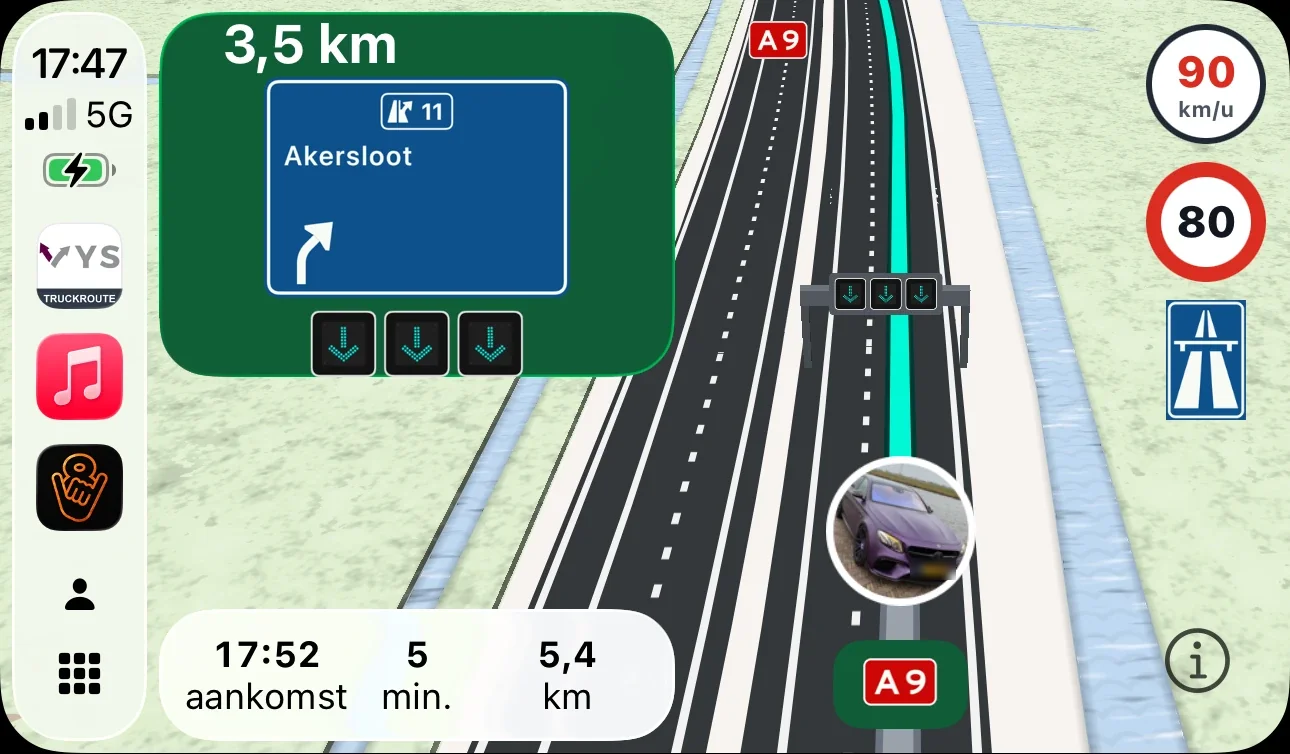
The route on the screen in the cab
The route the planner makes by number plate, with height, weight, zones and closures, is shown large on the screen of your truck or radio with Apple CarPlay.
Overhead signs next to the map
What the overhead signs above the motorway show (speed, red cross, arrows) is shown to the right of the map, per lane and only when something is shown.
House numbers and businesses nearby
At the destination the app shows what lies within about 100 metres, such as house numbers and business names, also in CarPlay.
Frequently asked questions
What do I need for CarPlay?
An iPhone with the Truckroute app and a truck or radio with Apple CarPlay. Without CarPlay you navigate on the phone itself.
Read also
- Truck navigation by number plate: Navigate a route that fits your truck: height, weight, zones and closures, with overhead signs, lanes and overtaking bans live on the way.
- The route planner for trucks: Route planner for trucks by number plate, with height, weight, low-emission zones, closures and charges. Up to 23 stops and navigation in the Truckroute app.
- A route around low-emission and zero-emission zones: For each number plate the verdict for every low-emission and zero-emission zone, and a truck route that avoids the zones your vehicle may not enter.
Try it on your own trips
New? Create an account with your e-mail address and try the route planner free for 7 days. A demonstration or a rate for your whole fleet? Contact VYS Scheduling BV: info@truckroute.nl or +31(0)85-4013599.
All amounts exclude VAT. Truckroute results are an indication; exemptions, signs and the official maps prevail, and no rights can be derived from these pages or the route planner. Privacy
All topics
Route and restrictions
Navigation and CarPlay
- Truck navigation by number plate
- CarPlay for trucks
- Live traffic information per country
Charges and tolls
LHV
Abnormal loads
- Abnormal loads: from exemption to navigation
- Navigation for abnormal loads
- Route for abnormal loads
- Exemption for abnormal loads: annual or one-off
- Legal dimensions and weights of a truck
- Route for high loads above 4 metres
- Route for wide loads
- Route for heavy loads above 50 tonnes
- Route for long loads
- Plan a route over the RDW exemption roads (DWO)
Dangerous goods and tunnels
Coach and bus
Cranes
Agriculture and parcels
- Navigation for agricultural vehicles
- Tractor navigation app: how to set it up
- Route over the agricultural road map
- May a tractor use the expressway or motorway?
- Sign C8: closed to agricultural vehicles
- How fast may a tractor go: 25 or 40 km/h
- Navigation for agricultural contractors and farms
- Navigating to a cadastral parcel
Zero-emission zones per city
- Zero-emission zone 's-Hertogenbosch: truck route and exemption
- Zero-emission zone Almere: truck route and exemption
- Zero-emission zone Alphen aan den Rijn: truck route and exemption
- Zero-emission zone Amersfoort: truck route and exemption
- Zero-emission zone Amsterdam: truck route and exemption
- Zero-emission zone Apeldoorn: truck route and exemption
- Zero-emission zone Arnhem: truck route and exemption
- Zero-emission zone Assen: truck route and exemption
- Zero-emission zone Breda: truck route and exemption
- Zero-emission zone Delft: truck route and exemption
- Zero-emission zone Den Haag: truck route and exemption
- Zero-emission zone Deventer: truck route and exemption
- Zero-emission zone Ede: truck route and exemption
- Zero-emission zone Eindhoven: truck route and exemption
- Zero-emission zone Enschede: truck route and exemption
- Zero-emission zone Gouda: truck route and exemption
- Zero-emission zone Groningen: truck route and exemption
- Zero-emission zone Haarlem: truck route and exemption
- Zero-emission zone Haarlemmermeer: truck route and exemption
- Zero-emission zone Leiden: truck route and exemption
- Zero-emission zone Maastricht: truck route and exemption
- Zero-emission zone Nijmegen: truck route and exemption
- Zero-emission zone Rotterdam: truck route and exemption
- Zero-emission zone Tilburg: truck route and exemption
- Zero-emission zone Utrecht: truck route and exemption
- Zero-emission zone Venlo: truck route and exemption
- Zero-emission zone Zwolle: truck route and exemption