
Abnormal loads
Abnormal loads: from exemption to navigation
Truckroute fetches or reads in your exemption, then navigates you exactly along it. The Netherlands with just the RDW exemption number, Belgium and Germany with the PDF of your permit. A trip across the border becomes one continuous route, with every structure listed, in the Truckroute app and in Apple CarPlay.
Three countries, one route
On the exemption page of the app, choose from which country to which country you drive. Then you get the permit for each country, in the order you drive:
- Netherlands: the numberEnter the exemption number. Truckroute fetches the permitted route itself from the RDW Digital Exemptions Road Map.
- Belgium: the PDFChoose the PDF of your permit from AWV, SPW or Brussels. The app reads the itinerary and builds the mandatory route from it.
- Germany: the PDFChoose the PDF of your German permit (VEMAGS). The app reads all routes (Fahrtwege) and picks the route part that fits your trip.
Driving from the Netherlands to Belgium? You first drive the Dutch route, and at its end the Belgian route starts by itself. There is nothing to do on the way.
Netherlands: fetch it with just the exemption number
Truckroute is the only navigation app that lets you navigate with just the RDW exemption number. You do not need an RDW account: the app fetches the permitted route from the public part of the Digital Exemptions Road Map (DWO), exactly the road sections the RDW permitted, in that order. With the route you see:
- The RDW route description, turn by turn, and the route on the map.
- The dimensions in the exemption, loaded and unloaded: length, width, height and weight.
- The escort: per part of the route how many escorts are required and over how many kilometres.
- Roadworks and restrictions on the route in the coming days, with description and duration.
- Every structure on the route: bridges, viaducts and tunnels with the RDW assessment, the clearance height and the weight.
The validity, the carrier, remarks and the number of transports are not public at the RDW; they are in the exemption itself.
Every structure on the route, with margin
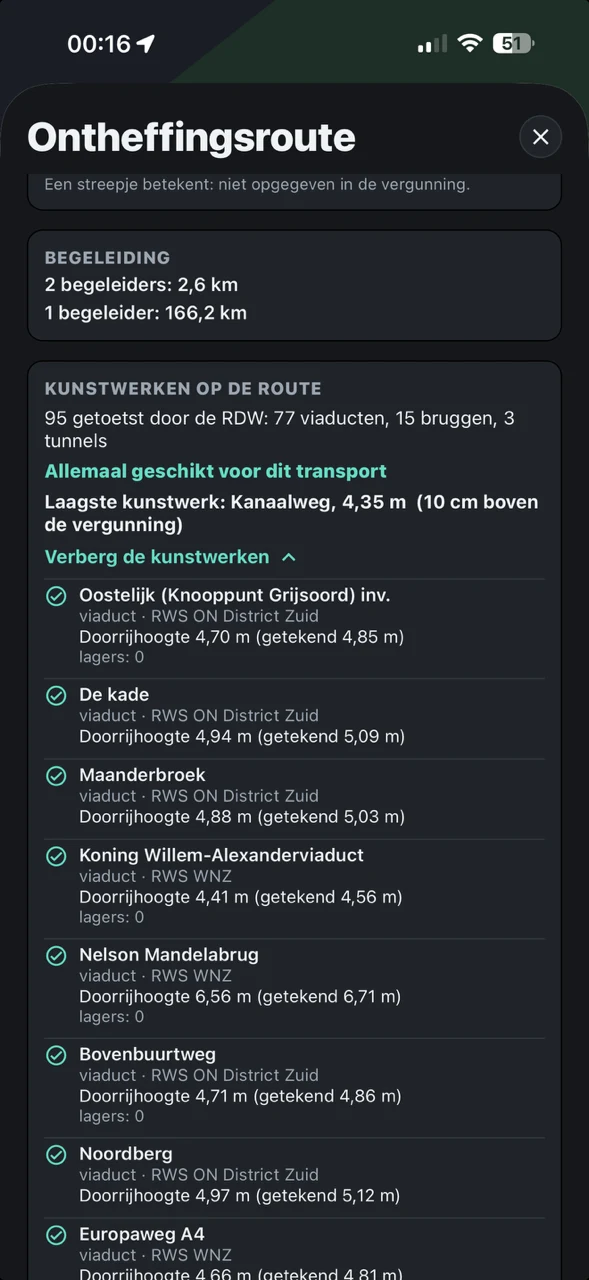
An example of a real exemption, fetched on 27-10-2026: a transport 4.50 m wide and 4.25 m high from Elst to Schiphol, 170.3 km over the A325, A15, A50, A12 and A4. Truckroute shows 95 structures assessed by the RDW, 77 viaducts, 15 bridges and 3 tunnels, all suitable for this transport. The lowest is the Kanaalweg viaduct with a clearance height of 4.35 m: 10 cm above the permitted height. Two escorts are required on 2.6 km, one on the other 166.2 km. Tap a structure to see it on the map, in its place in the permitted route.
Besides the structures of the exemption, Truckroute knows every bridge, viaduct, tunnel and level crossing in the Netherlands, more than 15,000.
Belgium: read in the permit as a PDF
For Belgium, choose the PDF of your exceptional transport permit from the Agentschap Wegen en Verkeer (AWV), the Service public de Wallonie (SPW) or Brussels. The app reads the itinerary from the PDF and builds the mandatory route from it. You see until when the permit is valid, the load, whether the itinerary only applies one way and every structure along the route, with the name, the road, the municipality and the instruction from the permit. A place in the itinerary the app cannot locate with certainty is named: check it on the map before you leave.
Driving in Belgium without a permit of your own? Then choose the Belgian exceptional transport network up to 90 or up to 120 tonnes. The route tells you at which border crossing you enter Belgium and whether the Belgian part is on the network.
Germany: read in the permit
For Germany, choose the PDF of your permit (Bescheid) from VEMAGS. The app reads all routes (Fahrtwege) and nodes from the permit and right away picks the route part (Fahrtwegteil) that fits your country of departure and arrival, so you have a route straight after reading it in. Driving another part? Pick another route part from the list. If the permit has more starting points or destinations for this trip, the app asks where you start and where you are going. The number of conditions (Auflagen) is shown.
Cross-border: before, between and after the permit
Switch on Cross-border for abnormal loads in the vehicle profile and the exemption page shows the choice of country of departure and arrival. Switched off, you only see the Dutch exemption number: that keeps it simple when you only drive in the Netherlands.
Not every part of a trip needs a permit. Per country you choose permit or network: in the Netherlands the indivisible load network, with the weight from your vehicle profile, in Belgium the network up to 90 or 120 tonnes. If the network comes before the permit, you drive from where you are over the network to the start of the permit, and the permit route starts there by itself. If it comes after, you choose the destination and the app takes you on over the network after the permit.
Navigating without ever deviating
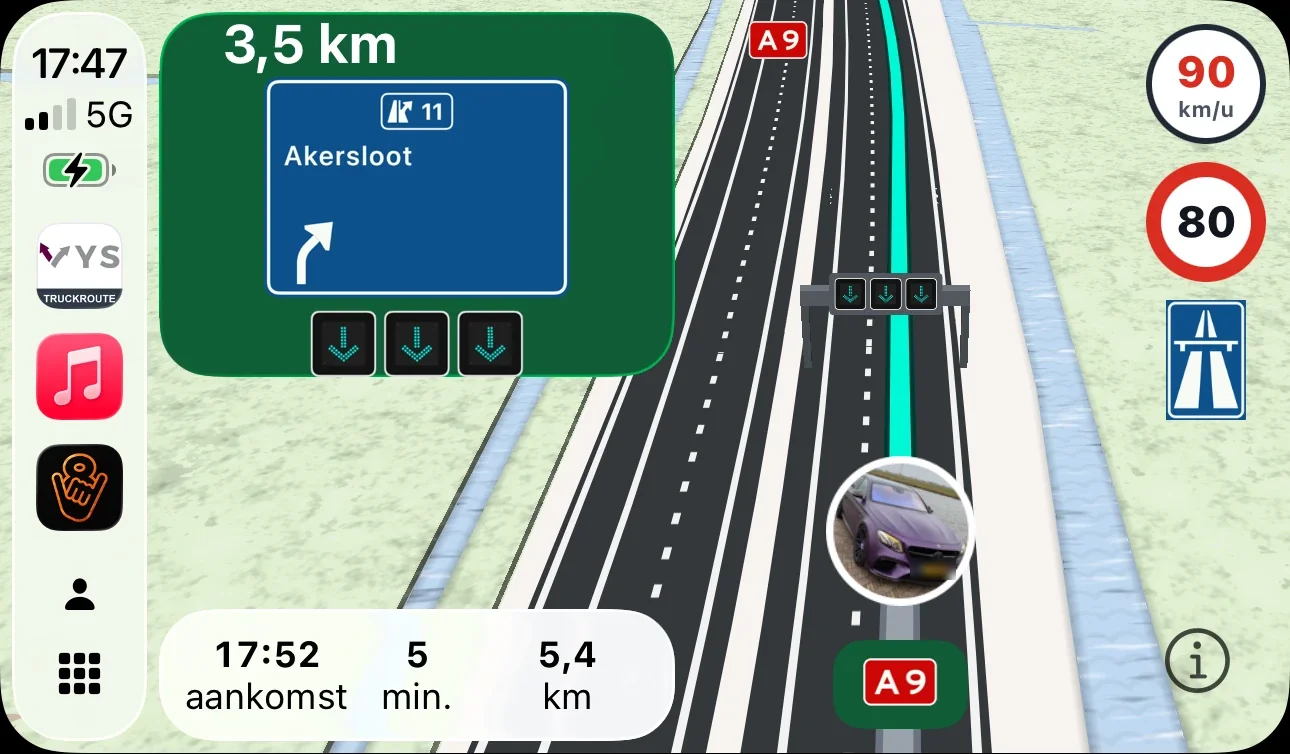
Start navigation and Truckroute guides you along the permitted route, with voice guidance, the lanes at every exit, the overhead signs on the motorway and your arrival time. On your iPhone or Android phone, and on the screen in the cab with Apple CarPlay.
The route follows your permit 100% and the navigation never deviates from it, not even for a traffic jam or a closure: you only get those as a warning. If you do leave the route, Truckroute guides you back to the point where you left it, never further along. If you are not at the starting point, you drive there first; the permitted route only begins at the starting point.
Map layers for abnormal loads
Under Map layers you find the layers you want to see on a trip with a large or heavy transport:
- Structures: bridges, viaducts and tunnels to tap, with height and, in Belgium, the instruction from the permit.
- Exceptional transport Belgium: the network up to 90 and up to 120 tonnes, obstacles, roadworks and accommodation.
- Truck parks, including the car parks in Belgium that are suitable for exceptional transport.
- Inside or outside the network: at the bottom next to the signs, also in CarPlay, a green or red sign showing whether you are on the network for special transport.
Save for later
Driving the same permit more often? Save it. You give it your own name, for example the customer or the load, and pick it next time with one tap on the exemption page. A combination of countries, such as a Dutch exemption number with a Belgian permit, is saved as one whole. Change the name with the pencil, delete it with the bin. You can save up to 15. If the app cannot fetch a permit fresh, it uses the saved version and tells you from which date it is.
No exemption yet? Plan within the decision space
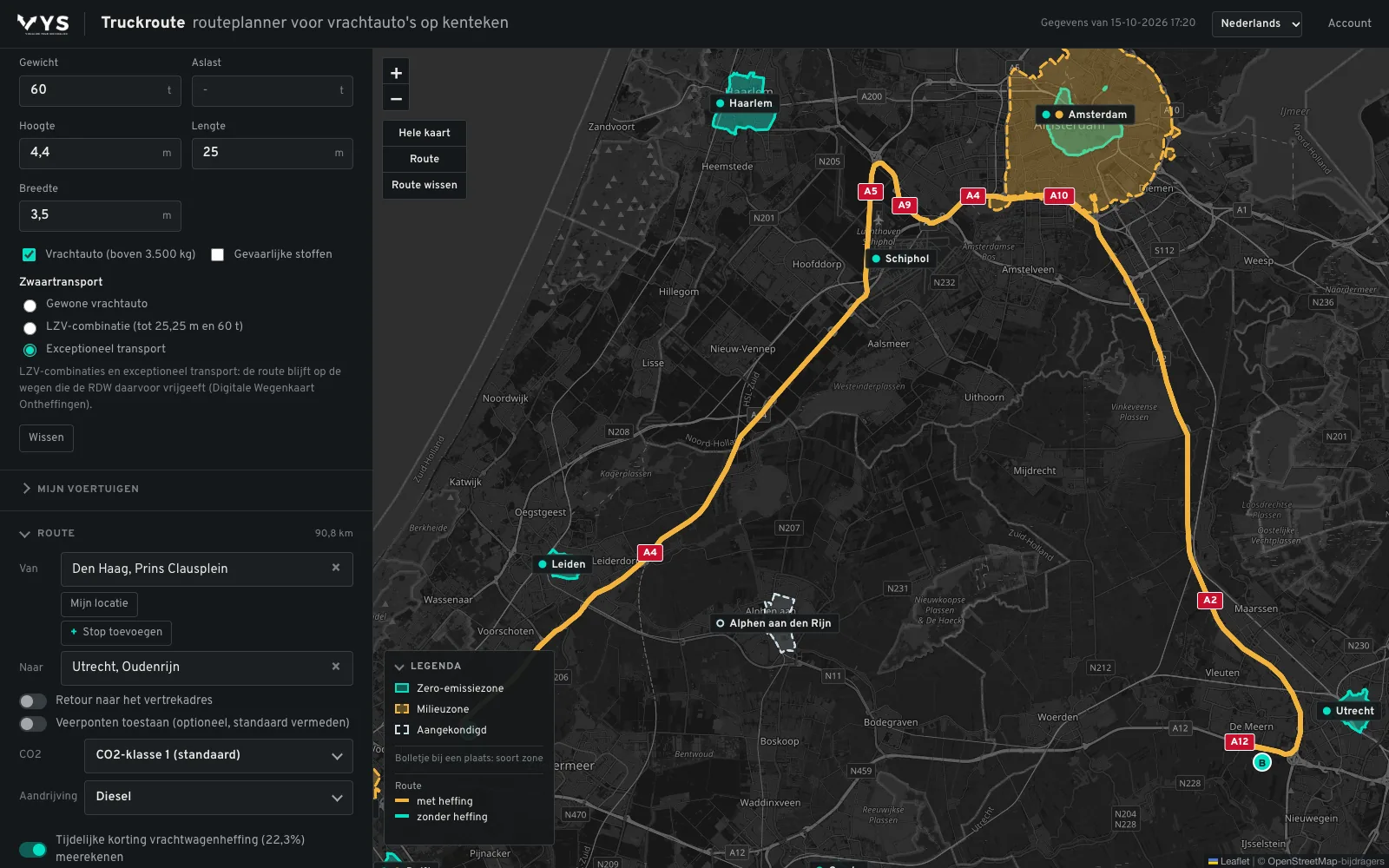
Want to know first which roads a transport can use? Enter the dimensions in the route planner. Truckroute then only plans over roads where the RDW itself can grant an exemption for that height, width, length and weight. At 4.4 m high, 3.5 m wide, 25 m long and 60 tonnes, the trip from the Prins Clausplein to Oudenrijn goes via the A4, the A10 and the A2: 90.8 km (calculated on 15-10-2026). More about planning within the decision space.
The permit remains binding
Truckroute does not apply for an exemption or permit and does not replace it. The app follows the route from the permit as precisely as the data allows; in case of a difference, the permit itself always prevails, with its conditions and the instructions of the escort and the road authority.
Frequently asked questions
Which countries does it work for?
The Netherlands with the RDW exemption number, Belgium with the PDF of a permit from AWV, SPW or Brussels, and Germany with the PDF of a VEMAGS permit. A trip can pass through several of those countries; the app drives the parts one after the other.
Do I need an RDW account?
No. The exemption number is enough: the app fetches the route from the public part of the Digital Exemptions Road Map.
Does the navigation avoid a traffic jam or closure?
No. A permit route never deviates. You get a traffic jam or closure on the route as a warning; the permit decides the route.
What if I am not at the starting point of the permit?
Then you drive to the starting point first. In a trip with a network part before it, the app takes you there over the network; at the starting point the permit route starts by itself.
Does it work in Apple CarPlay?
Yes. The permitted route, the turns, the lanes and the warnings are also on the screen in the cab.
Read also
- Route for abnormal loads: Enter the dimensions of your transport and Truckroute plans over the roads where the RDW can grant an exemption for them: height, width, length and weight.
- Exemption for abnormal loads: annual or one-off: Annual exemption up to 27.50 m, 3.50 m, 4.25 m and 100,000 kg on the green roads, or a one-off exemption per route. How to choose, and how to plan the route.
- Plan a route over the RDW exemption roads (DWO): See which roads in the RDW DWO are green for your dimensions, and let Truckroute plan a door-to-door route over them straight away.
- Route for a mobile crane: For the RDW a mobile crane is a self-propelled machine: annual exemption up to 100,000 kg, only on green roads. How to plan the route with Truckroute.
Sources: RDW: Digital Exemptions Road Map, RDW: one-off exemption, RDW: annual exemption for abnormal loads.
Try it on your own trips
New? Create an account with your e-mail address and try the route planner free for 7 days. A demonstration or a rate for your whole fleet? Contact VYS Scheduling BV: info@vysscheduling.nl or +31(0)85-4013599.
All amounts exclude VAT. Truckroute results are an indication; exemptions, signs and the official maps prevail, and no rights can be derived from these pages or the route planner. Privacy
All topics
Route and restrictions
Navigation and CarPlay
Charges and tolls
LHV
Abnormal loads
- Abnormal loads: from exemption to navigation
- Route for abnormal loads
- Exemption for abnormal loads: annual or one-off
- Legal dimensions and weights of a truck
- Route for high loads above 4 metres
- Route for wide loads
- Route for heavy loads above 50 tonnes
- Route for long loads
- Plan a route over the RDW exemption roads (DWO)
Dangerous goods and tunnels
Coach and bus
Cranes
Zero-emission zones per city
- Zero-emission zone 's-Hertogenbosch: truck route and exemption
- Zero-emission zone Almere: truck route and exemption
- Zero-emission zone Alphen aan den Rijn: truck route and exemption
- Zero-emission zone Amersfoort: truck route and exemption
- Zero-emission zone Amsterdam: truck route and exemption
- Zero-emission zone Apeldoorn: truck route and exemption
- Zero-emission zone Arnhem: truck route and exemption
- Zero-emission zone Assen: truck route and exemption
- Zero-emission zone Breda: truck route and exemption
- Zero-emission zone Delft: truck route and exemption
- Zero-emission zone Den Haag: truck route and exemption
- Zero-emission zone Deventer: truck route and exemption
- Zero-emission zone Ede: truck route and exemption
- Zero-emission zone Eindhoven: truck route and exemption
- Zero-emission zone Enschede: truck route and exemption
- Zero-emission zone Gouda: truck route and exemption
- Zero-emission zone Groningen: truck route and exemption
- Zero-emission zone Haarlem: truck route and exemption
- Zero-emission zone Haarlemmermeer: truck route and exemption
- Zero-emission zone Leiden: truck route and exemption
- Zero-emission zone Maastricht: truck route and exemption
- Zero-emission zone Nijmegen: truck route and exemption
- Zero-emission zone Rotterdam: truck route and exemption
- Zero-emission zone Tilburg: truck route and exemption
- Zero-emission zone Utrecht: truck route and exemption
- Zero-emission zone Venlo: truck route and exemption
- Zero-emission zone Zwolle: truck route and exemption